
Help AI search understand your property listings with Locrating
Table of Contents
Table of Contents
At a glance
- The Property Hive Locrating integration now supports Locrating’s new SEO, GEO & AI API.
- You can now add local area info and structured data directly to your property listings.
- The new functionality requires access to Locrating’s paid Professional package, with additional API charges.
- Already using Locrating? Find out how to get started below.
Buyers and tenants have much more to consider than just price, property type and bedrooms when searching for their next home.
What are the local schools like? Is there a train station nearby? How far is the nearest supermarket? Are there parks and green spaces within walking distance?
These are all things that can have a huge impact on someone’s daily life and ultimately influence whether a property is right for them.
Providing this information on your property listings is therefore a bit of a no brainer. The trouble is that researching it all, writing it up and keeping it accurate across potentially hundreds of properties can be a time-consuming task.
Thanks to Locrating’s new SEO, GEO and AI API, Property Hive users can now automatically add detailed, property-specific local area information to their listings, giving visitors a better understanding of what’s nearby while also providing useful context for search engines and AI-powered search tools.
The latest version of our Locrating add on supports this new functionality, so let’s take a closer look at what’s changed.
Already using our Locrating add on?
Want the short version? There’s some great new functionality available, and we think it’s well worth a look.
If you’re happy to trust us on that and skip the technical explanation (we won’t be offended!), jump straight to how to get started.
Our Locrating integration: what’s changed?
If you’ve not come across Locrating before, they’re a UK-based company specialising in local area information, particularly schools, catchment areas and local amenities.
We first integrated with them back in 2019, allowing Property Hive users to display interactive school maps, including Ofsted ratings and other useful school information, directly on their property listings.
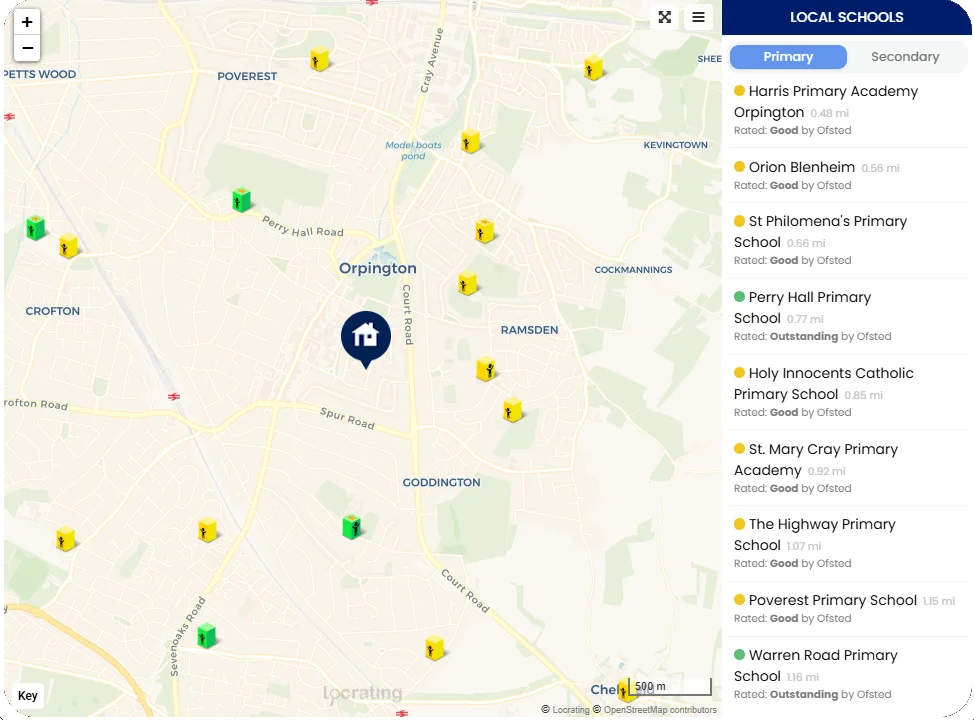
It’s been one of our most popular integrations ever since, and we’ve expanded it along the way to support more of Locrating’s offering, including broadband speeds, sold prices and other useful local insights like flood risk maps and local transport information.
Until now, this information has been displayed on your property listings through an embedded Locrating widget. That’s still possible, but the latest updates mean you can opt for Property Hive to take detailed, written local area content from Locrating and add it directly to your property pages as content or structured data behind the scenes.
More useful information for people viewing your properties
Imagine somebody viewing a property on your website who wants to know a little more about the area before arranging a viewing.
They might be interested in nearby schools, how easily they could get to work or whether there’s a supermarket within walking distance. Normally, finding all of that out could involve several separate searches.
With Locrating’s new API, much of this information can be displayed directly on the property listing they’re already viewing.
And we’re not talking about a generic description of the town or a simple list of nearby amenities. The API generates properly written content based on the location of the individual property.
Here’s an extract from a real example provided by Locrating:
There are seven good or outstanding primary schools within two miles, including Slade Primary School and Attached Unit for Children with Hearing Impairment (rated good by Ofsted) around an 11-minute walk, and Cage Green Primary School (rated good by Ofsted) around a 14-minute walk.
And it doesn’t stop at schools. Locrating can also provide information about estimated school catchments, nearby transport connections, shops, healthcare facilities and other local amenities.
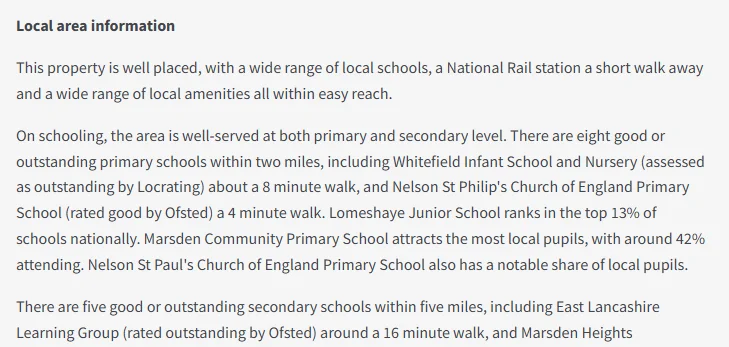
That’s the sort of information somebody might otherwise spend time researching across several different websites, now available alongside the property they’re considering.
For buyers and tenants, it means having more of the information they need in one place. For estate agents, it’s an opportunity to provide more informative property listings without having to research and maintain all that information manually.
Helping search engines and AI understand your properties
There’s another interesting benefit to this latest update.
The way people search for property is changing. Traditional searches such as “3 bedroom houses for sale in Rugby” are increasingly being complemented by more conversational questions, particularly as AI-powered search tools become more widely used.
For example, someone might ask:
“Find me a family home in Warwick near highly rated primary schools.”
For a search system to identify relevant properties, information such as price, location and number of bedrooms is a very useful starting point. But a question like this also requires an understanding of what’s around the property.
This is where structured data, commonly referred to as schema, comes in. Structured data is a way of describing information on a web page in a format that machines can understand more easily.
Building on Property Hive’s existing schema support
Property Hive already supports RealEstateListing schema when Yoast SEO or All in One SEO is active. This identifies important information about your properties, including their price, location, bedrooms and other details.
The latest Locrating integration complements this by adding structured information about the area surrounding each property.
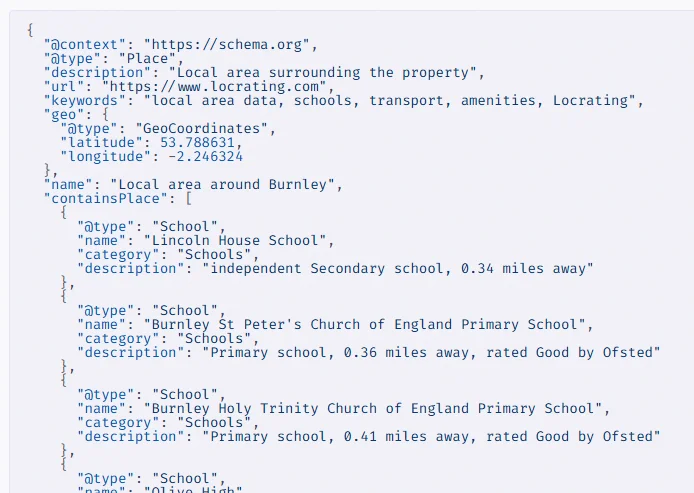
Alongside the written content, Locrating’s API returns JSON-LD structured data identifying individual nearby locations, including schools, transport connections, shops and healthcare facilities, together with details such as their names, distances and relevant ratings or descriptions.
It also provides structured questions and answers about the surrounding area, covering things such as nearby schools, estimated catchment areas, transport links and local amenities.
Property Hive adds this structured data to your property pages, making it available to search engines and other systems that can process it.
Will this help my properties appear in AI search?
Potentially, but it’s important to be realistic about what structured data can and can’t do.
Google explains that structured data helps it understand the content of a page, but even correctly implemented markup doesn’t guarantee a particular appearance in search results.
The same principle applies to AI search. Different platforms gather, interpret and present information in different ways, which means there’s no single formula that will guarantee your properties appear in AI-generated answers. We wish there was!
But that doesn’t mean there aren’t things you can do to put yourself in a better position. Much like traditional SEO, getting the foundations right is incredibly worthwhile. Making sure your property information is accurate, detailed, well organised and accessible gives search engines and AI systems more useful information to work with.
Structured data is one part of that, and Locrating’s new API helps by adding more context about each property’s surroundings.
It’s not a magic switch for AI visibility, but it is another practical step towards making your property listings easier to understand and better prepared for the way people are beginning to search.
How to get started
The Property Hive Locrating integration is free to use, although you’ll need a paid subscription with Locrating to access their new API.
If you’re already using our Locrating add on, the new functionality is supported in the latest release.
Here’s what you’ll need to do:
1. Update your Locrating add on: Make sure you’re running the latest version of the Property Hive Locrating add on.
2. Arrange access with Locrating: Contact Locrating to enable their new SEO, GEO and AI API on your account.
3. Open your Locrating settings in Property Hive: Here you’ll find the new local area information options.
4. Choose what to display: Enable the relevant content and structured data output for your property listings.
5. Check a property on your website: Visit a property listing to see the new local area information in action.

A quick note about displaying the content
If your property descriptions already include information about nearby schools, transport links and local amenities, it’s worth checking how Locrating’s new content will fit alongside that. You don’t want to end up repeating the same information or making your property pages unnecessarily cluttered.
You can choose whether to display the written HTML content, so we’d recommend trying it on a few property listings first and seeing what works best for your website.
Access to Locrating’s new API is available to customers on their Professional package and is subject to additional charges. You’ll need to arrange this directly with Locrating before using the new functionality.
If you’re already using Locrating, take a look at the latest add on update and speak to their team about enabling the new API.