
How to import property listings from an XML feed into WordPress (with AI-powered field mapping)
Table of Contents
Table of Contents
Importing properties from your CRM into WordPress should be simple. But setting up an XML import often requires manually mapping each field, making it time consuming and fiddly.
Thankfully, there’s a quicker way. Simply provide your XML feed URL and Property Hive will analyse the data structure, identify the available fields, and automatically suggest the mappings needed to import your property listings into WordPress.
The result? Faster setup, fewer manual tasks and your properties imported into WordPress in much less time.
How to import properties into WordPress using XML
If you’re looking for a way to import properties from your CRM into WordPress using XML, you’re in the right place.
Property Hive supports property imports in the XML format, allowing you to pull property data into WordPress directly from an XML feed URL. Simply create a new import, add your XML feed, map the fields and run the import.
Better still, Property Hive uses AI to automatically suggest the field mapping rules for you, significantly reducing setup time.
Ready to import properties using XML?
Start your free 7-day trial of Property Hive and see how quickly you can configure XML imports with AI-powered field mapping.
What is XML?
XML is a standard format used to exchange data between systems. In the property and real estate industry, many CRMs, property management systems and real estate software platforms export property listings as XML feeds.
Each feed contains structured information about every property, allowing websites to stay automatically up to date. Typical XML fields include:
- Price
- Address
- Property type
- Bedrooms
- Bathrooms
- Description
- Images
Whether you’re importing residential, commercial or rental properties, XML remains one of the most common formats for transferring property listings from business software into WordPress.
How do XML property imports work?
When you create an XML import, Property Hive reads the data from your XML feed and imports it into the correct Property Hive fields.
It sounds simple enough, but unfortunately there’s a catch… Every CRM structures its data slightly differently.
For example, one CRM might use:
bedrooms
Another might use:
bedroom_count
Another might use:
beds
All three mean the same thing but Property Hive needs to know where that information belongs.
That’s where field mapping comes in. In other words, Property Hive needs instructions that tell it where each piece of data belongs.
What are field mapping rules?
Field mapping rules tell Property Hive how to interpret the data in your XML feed.
A field rule essentially says: “Take data from this XML field and save it to this Property Hive field.”
Without these rules, Property Hive wouldn’t know which XML field contains the property price, which contains the description, or which contains the number of bedrooms.
Field mapping is an essential part of configuring any property import.
Why is creating field rules manually a pain?
Large XML feeds can contain dozens or even hundreds of fields. Manually reviewing every field and creating mapping rules takes time and increases the chance of mistakes.
That’s exactly why we built automated field rule suggestions. Instead of manually creating rules one by one, Property Hive will do the heavy lifting for you.
How does Property Hive’s AI field mapping work?
Property Hive can now analyse your XML feed and automatically suggest field mapping rules.
The AI reviews:
- XML field names
- Common property industry terminology
- Existing Property Hive fields
It then generates suggested mappings that can be reviewed before saving.
Importantly, you remain in full control. Every suggestion can be:
- Accepted
- Edited
- Removed
- Supplemented with additional rules
As a result, most XML imports can be configured in seconds rather than minutes.
A step-by-step guide to import properties into WordPress using XML
Once you have access to an XML feed from your CRM, property management system or real estate software, Property Hive makes it easy to import properties into WordPress.
Here’s how it works in practice:
Step 1: Create a new import
Firstly, navigate to ‘Property Hive > Import Properties’.
Then click ‘Create New Import’.
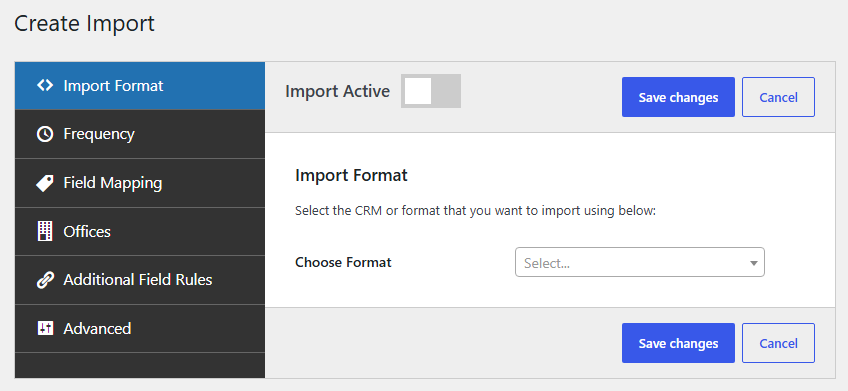
Step 2: Choose XML as the import format
After that, select XML from the available import formats.
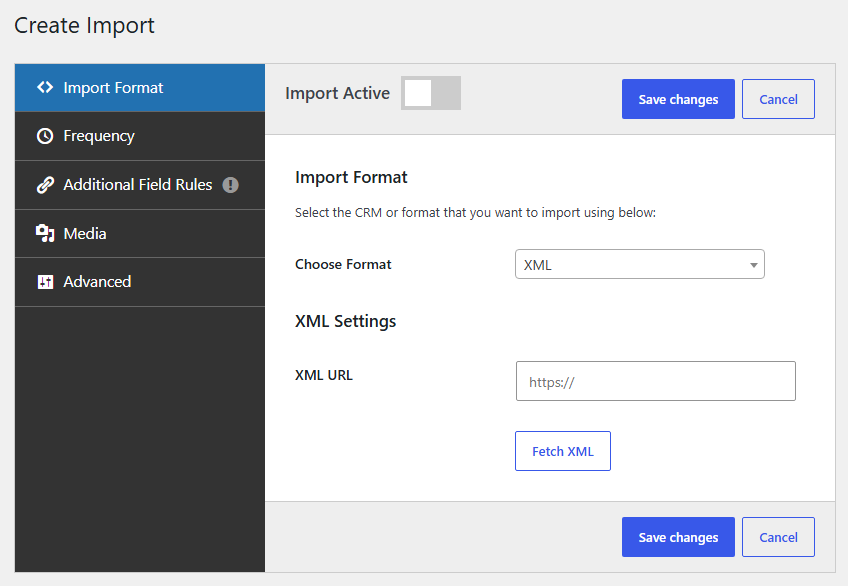
Step 3: Enter your XML feed URL
Now, paste your XML feed URL into the import configuration and click ‘Fetch XML’.
Property Hive will inspect the feed and identify the available fields.
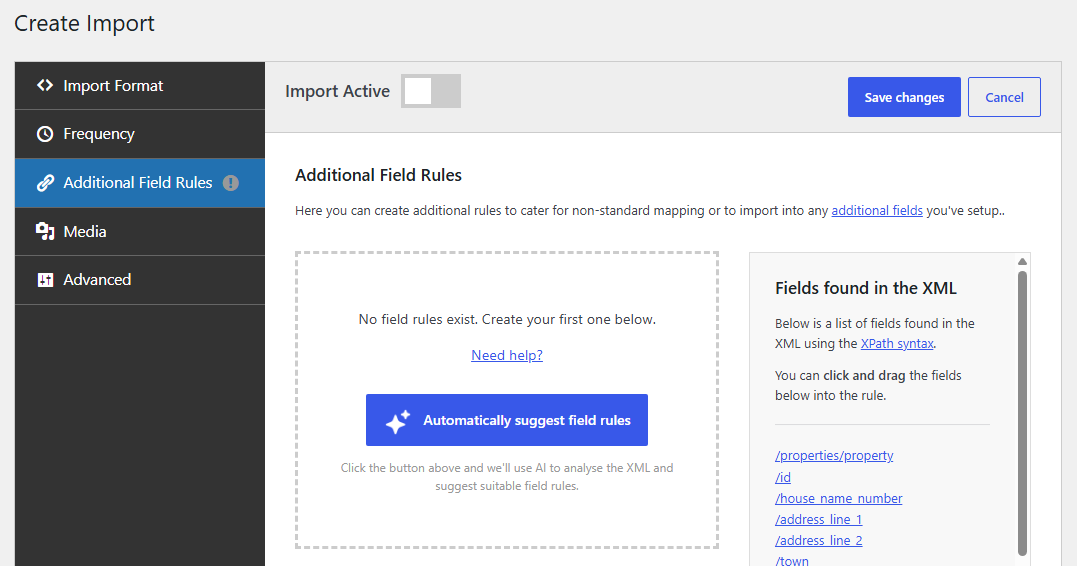
Step 4: Automatically generate field mapping rules with AI
Next, scroll down to the ‘Additional Field Rules‘ section and click ‘Automatically Suggest Field Rules‘.
Property Hive will analyse your XML feed and generate suggested mappings automatically.
Step 5: Review the suggestions
Lastly, now review the suggested field mappings.
You can:
- Accept them as-is
- Edit individual mappings
- Add additional rules
- Remove suggestions you don’t need
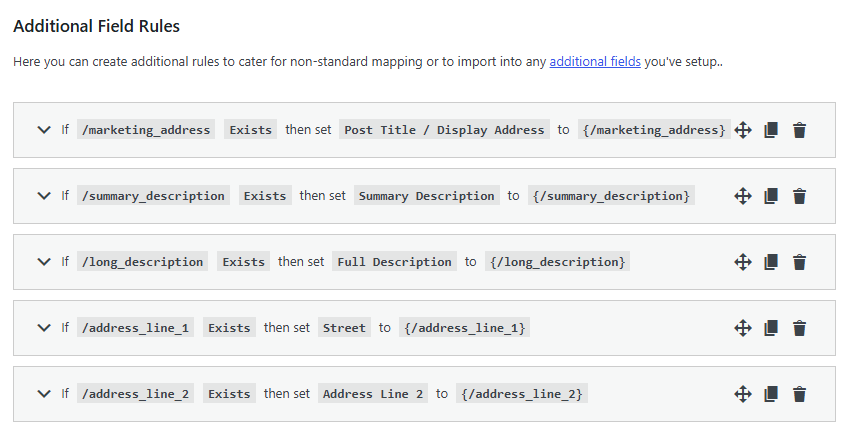
Finally, once you’re happy with the suggested mappings, save the import and run it.
That’s all there is to it. With Property Hive, importing properties from an XML feed takes just a few minutes.
A better way to import properties
Whether you’re importing from a CRM, XML feed, CSV file, JSON feed or API, Property Hive makes it easy to bring property data into WordPress.
Start your free 7-day trial today and try it with your own XML feed.
Try Property Hive for free for 7 days
FAQs
Yes. Property Hive supports XML imports and can import property data directly from XML feed URLs.
Yes. Property Hive can analyse an XML feed and automatically suggest field mapping rules based on the data structure and Property Hive’s available fields.
Absolutely. Every suggested rule can be reviewed, edited or removed before the import is saved.
The feature works with standard XML property feeds and is designed to help reduce manual configuration regardless of CRM provider.