
Table of Contents
On the 15th January 2016 I released the very first iteration of our now-popular Property Import add on for Property Hive. Little did I know at the time that it would change the course of my life and nearly 10 years later, I would still be still actively developing it.
In that very first version the import add on supported one format, BLM, and it wasn’t even automated. You had to manually upload the BLM file in question. As demand grew, support for more formats and CRMs were supported, new settings were added, and of course automating these imports became a key feature.
But with that growth came inevitable challenges. As more features and formats were added we started to get bloated code, new settings just placed anywhere they would fit into the current UI, and as time went on, an interface that just felt a little dated.
Version 3.0 marked one of the biggest updates to the Property Import add on, introducing a rebuilt interface, improved performance and support for generic XML and CSV imports.
What was new in version 3.0?
If you’d prefer to have me personally walk you through the updates these can be found in the video below:
Alternatively you can also read about the updates below:
Built from the ground up
Just like with a house, the foundations of any software are paramount to its stability and longevity.
That’s why we didn’t just tweak version 2. We started from scratch. A complete rebuild of the plugin with stability, performance, and scalability at its core.
Version 3.0 contained approximately 70,000 fewer lines of code than its predecessor. It’s cleaner, leaner, and built to be easier to maintain, making it more straightforward to add support for new CRMs and formats in the future.
Improved UI
Straight away you’ll notice the updated header where we’ve added clear buttons to access documentation and to create a new import.

A tabbed navigation bar makes it possible to jump between different sections and a new ‘Settings’ area has been introduced. We’ve moved some settings from being at a per-import level, to a global level.
For most agents with one import in place this won’t make a difference, but for agents or portals that have multiple feeds setup this makes managing imports easier; you can now change the settings in one place as opposed to having to go into each of the imports individually.
The main imports table is similar to version 2 but with the addition of a filter to filter imports, which is useful if you have lots of imports set up.

Editing imports made easier
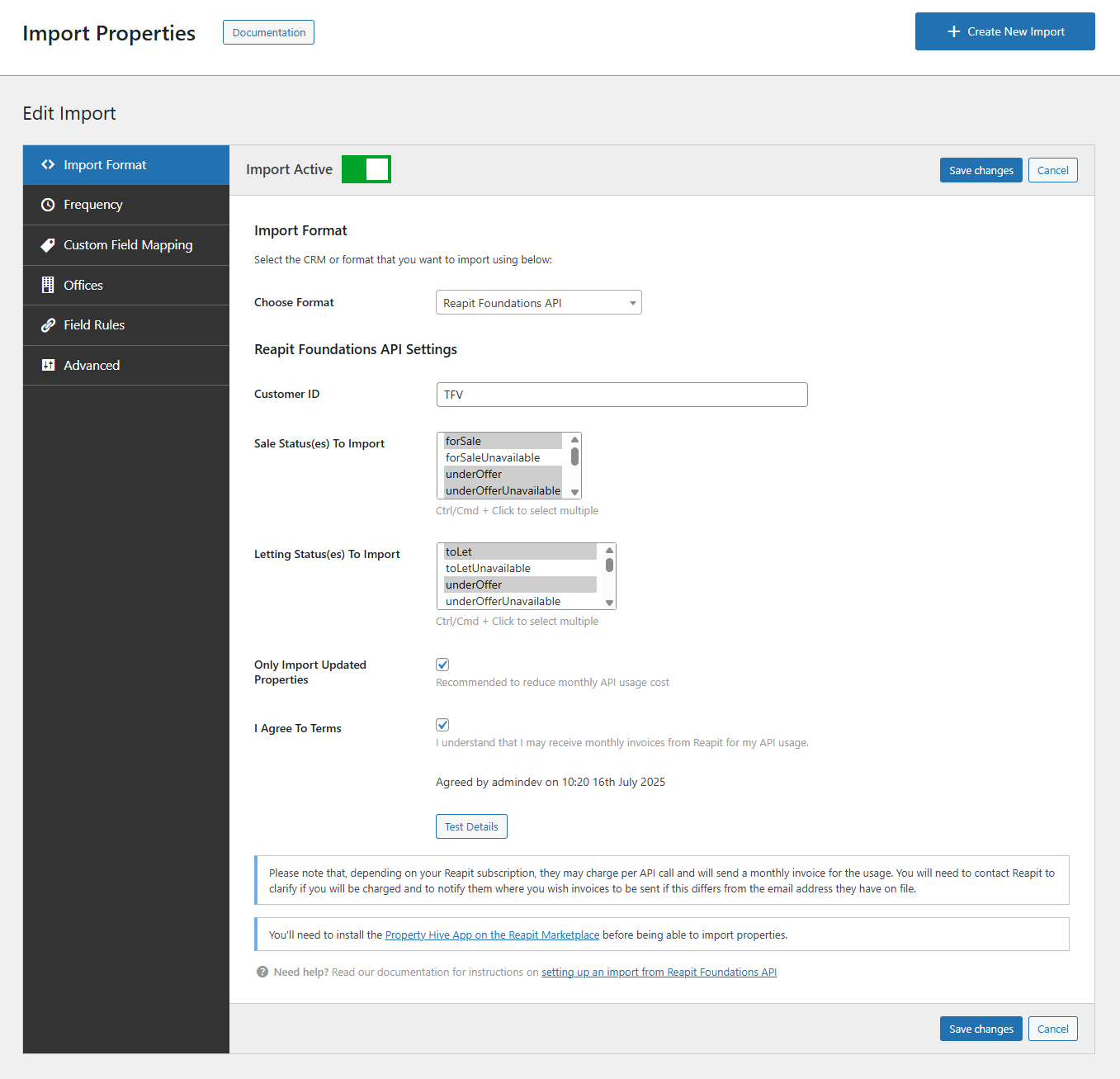
Following on from the above, one of the most noticeable changes is the revamped screen for creating and editing imports. Over time, this area had grown out of control as we added more functionality, making it increasingly difficult to navigate.
Previously, this process was handled through a step-by-step wizard with long, unstructured pages. There was little prioritisation of settings, and finding what you needed often meant scrolling through everything.
In version 3 we replaced this with a clean, tabbed layout. This new design makes it far easier to navigate import settings. You can now jump directly to the section you need, and related settings are grouped together logically.
Real-time progress indicator
My personal favourite addition; you can now see in real-time exactly what the import is doing:
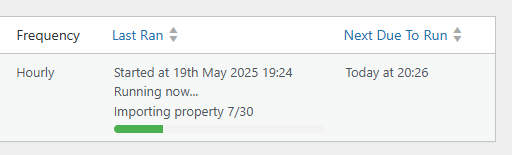
As the import parses, imports and removes properties, this will be reflected in the main imports table. No more guessing or having to check the logs to see where it’s up to.
Support for generic XML and CSV files
Ok I lied, maybe this is my favourite addition. There’s just too many to choose from.
We’ve seen it countless times where an agency doesn’t use one of the CRMs we support; maybe they’ve built their own CRM, or they use software from another corner of the earth.
Previously, unless this CRM could export the data in one of the formats we support, we couldn’t help. That is until now…
As long as the third party can provide data in XML or CSV, regardless of the structure or schema, we can now import it.
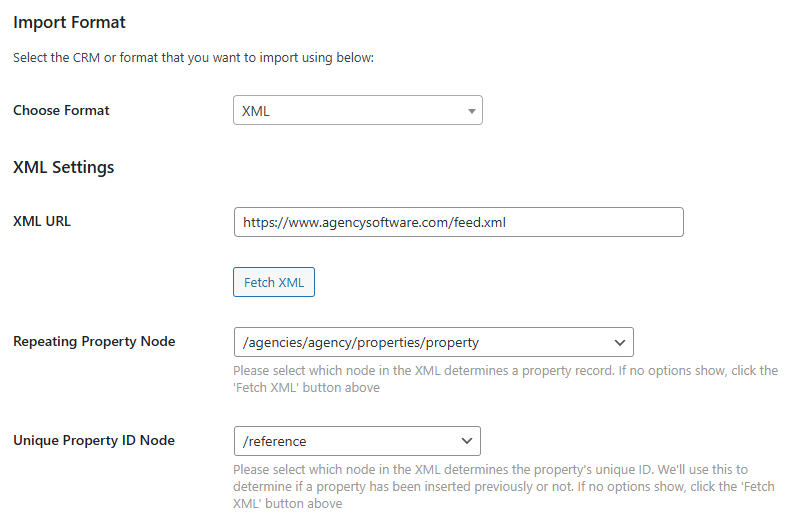
Simply enter the URL to the file, select which fields in the data denote the property and unique ID fields.
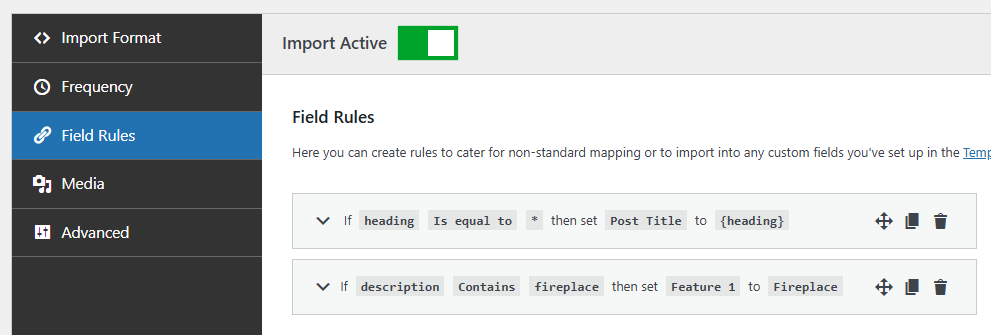
Then use our ‘Field Rules’ section to map the fields in your XML or CSV file to the correct fields in Property Hive.
If you’re importing properties from an XML feed, read our guide to importing properties into WordPress using XML to learn how Property Hive can automatically suggest field mappings using AI.
Field rules
Previously this would be a case of needing to write a PHP snippet. Yuk! Nobody wants to be doing that.
That’s why we introduced the Field Rules section, allowing you to map fields from your XML or CSV data to the correct fields in Property Hive without writing any code.
Today, Property Hive can even suggest those field mappings automatically using AI, making XML imports even faster to configure. Learn more about importing properties into WordPress using XML.
And more…
- We’ve added the ability to ‘kill’ an import that is currently running should you wish to stop the import prematurely.
- We’ve added the ability to clone or duplicate existing imports.
- You can now run individual imports manually. Previously you could run imports manually but this would run all of them.
- You can order the main imports table by format, last ran or next due by clicking the column heading.
- We’ve optimised imports resulting in less database queries and faster imports.
- Under the ‘Advanced‘ tab of an import’s settings you can specify limits on the number of properties imported.
- Under the ‘Advanced‘ tab of an import’s settings you can specify limits on the number of images imported per property.
- We’ve added the ‘only import updated properties‘ setting to all formats where applicable (i.e. where we receive a modified date in the data).
- A ‘Test Details‘ button added to all formats.
- Imports improved to continue from where they last got up to should they fall over for whatever reason.
- We’ve removed support for ten formats. After extensive research we found we were supporting formats that in all these years weren’t being used.
With a valid license key you’ll be able to update to this new version of the Property Import add on through WordPress. With it being such a big update we recommend that you take a backup first.
If you’re not already using Property Hive but are looking to automatically import your properties from your CRM, simply visit the add on page below to get started: